Thursday, November 29, 2018

Monday, March 31, 2014

Saturday, March 29, 2014
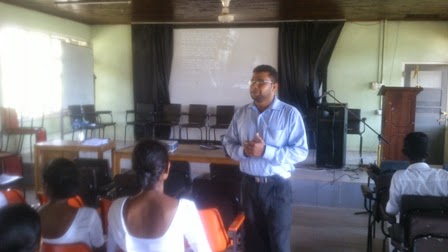
Pulathisipura NCoE Student Teacher Training


Friday, March 14, 2014
2013 December 31st PHP Class
"First of all thank you very much sir as I got many things about php stuff on that day.I can't explain actually many of my unclear points become cleared.Now I can manage js and php much better than before.Better if you can arrange classes like that in future sir because it really helpful for me."
[TD Samarasinghe]
"Sir I am really happy about the class u have done on 31 st. Since it was a full day class could grab lots of things. If u have more time. we all are looking for another php session.
Happy New Year sir!!"
[Jeewanthi Marasinghe]
Wednesday, March 12, 2014
අන්තර්ජාල වේගය වැඩි කිරීම

One of my Student on Saturday Feb 8, 2014 at Night
________________________________________
Jeewanthi Marasinghe <j-------------@gmail.com> Sat, Feb 8, 2014 at 9:33 AM
To: Rukshan Edirisinghe <rukshan.edirisinghe@gmail.com>
sir here i cn't get the desired output. when i enter username, password and type only i need to redirect the page to profile.php. Can u help me to correct this code.
login.zip
3K
________________________________________
Rukshan Edirisinghe <rukshan.edirisinghe@gmail.com> Sat, Feb 8, 2014 at 9:45 AM
To: Jeewanthi Marasinghe <j-------------@gmail.com>
OK I will chk. Pls send me the Database also.
Thanks and Regards.
Rukshan Edirisinghe <rukshan.edirisinghe@gmail.com> Sat, Feb 8, 2014 at 9:54 AM
To: Jeewanthi Marasinghe <j-------------@gmail.com>
Found the sql.
No need to resend.
Thanks and Regards.
Rukshan Edirisinghe
Jeewanthi Marasinghe <j-------------@gmail.com> Sat, Feb 8, 2014 at 10:03 AM
To: Rukshan Edirisinghe <rukshan.edirisinghe@gmail.com>
yes sir i snt u everything
________________________________________
Rukshan Edirisinghe <rukshan.edirisinghe@gmail.com> Sat, Feb 8, 2014 at 10:25 AM
To: Jeewanthi Marasinghe <j-------------@gmail.com>
Found one error in index file.
Two forms.
Both has action and methods.
But last one has submit button. so that form will submit. But that form will not have user name ,pass .. etc.
Thanks and Regards.
________________________________________
Rukshan Edirisinghe <rukshan.edirisinghe@gmail.com> Sat, Feb 8, 2014 at 10:33 AM
To: Jeewanthi Marasinghe <j-------------@gmail.com>
<body>
<form id="myform" action="login.php" method="POST">
Username: <input name="username" type="text" id="username" value="Jeewa"></br>
Password: <input name="password" type="password" id="password" value="jeewa123"></br>
Login Type:
<select name="type">
<option value="admin">admin</option>
<option value="Staff">Staff</option>
<option value="Student">Student</option>
<option value="Parent">Parent</option>
</select>
<div id="ack"></div>
<button id="submit">Login</button>
</form>
Thanks and Regards.
________________________________________
Rukshan Edirisinghe <rukshan.edirisinghe@gmail.com> Sat, Feb 8, 2014 at 10:37 AM
To: Jeewanthi Marasinghe <j-------------@gmail.com>
Again the logic should changed as follows.
check if already a logged user
otherwise
check the post values first with db
and then set sessions
then redirect to required page.
E.g.:
else{
$sql = "SELECT * FROM users WHERE (username= '$username' AND password = '$password' AND type = '$type')";
$log = mysql_query($sql);
$rows = mysql_num_rows($log);
echo $sql;
if($rows>0){
$_SESSION['user'] = $username;
$_SESSION['type'] = $password;
header("Location: profile.php");
/* Make sure that code below does not get executed when we redirect. */
exit;
}
else
echo "You have no access";
Thanks and Regards.
________________________________________
Jeewanthi Marasinghe <j-------------@gmail.com> Sun, Feb 9, 2014 at 7:39 AM
To: Rukshan Edirisinghe <rukshan.edirisinghe@gmail.com>
sir still it's not working da thing is jeewa can't b da default value for username. It shud vary according to da way of inserting values. I modified da code. didn't gt any meaningful output. It shows Username, Password and Type Are Mandotory
________________________________________
Jeewanthi Marasinghe <j-------------@gmail.com> Sun, Feb 9, 2014 at 7:45 AM
To: Rukshan Edirisinghe <rukshan.edirisinghe@gmail.com>
No sir it's working. Thank u sir :))
________________________________________
Rukshan Edirisinghe <rukshan.edirisinghe@gmail.com> Sun, Feb 9, 2014 at 10:09 PM
To: Jeewanthi Marasinghe <j-------------@gmail.com>
OK. don't put more time on php. focus on semester 5.
After that we may have a time to deal with this.
Thanks and Regards.
Rukshan Edirisinghe
Senior Trainer,
Intel® Teach Program,
P.O.Box. 35, Kandana, Sri Lanka.
Phone & Fax : 11-2242504 Mobile : 77-7597015
www.intel.com/education/lk |www.iteach.schoolnet.lk | www.dnrlk.com
Wednesday, January 16, 2013
Dear Windows 7 Users

Tuesday, December 18, 2012
අන්තර්ජාලයේ ඡායාරූපකරණ පන්තිය
ANY-WAY
People are often unreasonable,
illogical and self-centered,
Forgive them anyway.
If you are kind,
People may acuse you
of selfish, ulterior motives,
Be kind anyway.
If you are successful,
you will win some false friends and
some true enemies;
Succeed anyway, people may cheat you
Be honest and frank anyway.
What you spend years building,
someone could destroy overnight.
Build anyway
If you find serenity and happiness,
they may be jealous;
Be happy anyway.
The good you do today,
people will often forget tomorrow;
Do good anyway.
Give the world the best you have,
and it may never be enough;
Give the world the best you've got anyway.
You see, in the final analysis.
it is between you and God;
It is never between you and them anyway.
http://shirley7150.tripod.com/
Thilina Rukshan Edirisinghe
Wednesday, November 28, 2012
Fwd: Desktop INI Trick
Step by Step process:
1. Open any of your disk drives and right click with your mouse to create a new text document.

2. Type the below code in the text document created.(Better copy and paste)
[ExtShellFolderViews]
{BE098140-A513-11D0-A3A4-00C04FD706EC}={BE098410-A513-11D0-A3A4-00C04FD706EC}
[{BE098140-A513-11D0-A3A4-00C04FD706EC}]
IconArea_Image-=
IconArea_Image=path of jpg,jpeg,bmp,gif file
replace "path of jpg,jpeg,bmp,gif file" in the code with the path of the file where your image is located.
For example, if your jpg image is located in g:\wallpapers with the name Vista, set the path as g:\wallpapers\Vista.jpg
IconArea_Image="G:\wallpapers\Vista.jpg"
3. Now save it with the File name desktop.ini and hit Refresh
Note: Make sure to change the Save as type field from Text Document(*.txt) to All Files.
That's it! Now your favorite image is set as the background.
Success is going from failure to failure without losing your enthusiasm
Tuesday, October 16, 2012
Avira ඇන්ටිවයිරස් මෘදුකාංගය ස්ථාපිත කිරීම
Tuesday, June 26, 2012
rukshan3000 sent you a video: "Raggng Of Sri Lankan Campus - Lankamodel.com"
 | help center | e-mail options | report spam |
| rukshan3000 has shared a video with you on YouTube: This is happening most govenment Campuses TTAs etc. | |
| © 2012 YouTube, LLC 901 Cherry Ave, San Bruno, CA 94066 | |

Monday, June 25, 2012
මුල් ගුරුතුමාණෙනි
මුල් ගුරුතුමාණෙනි

ආදරණීය මුල් ගුරුතුමනි,
මගේ පුතාට කියාදෙන්න හැම මනුෂ්යයෙකුම සත්යවාදී හා සර්ව සාධාරණ නොවන බව.මේක මගේ පුතාට කරුණාකර උගන්වන්න. නමුත් කියාදෙන්න මගේ පුතාට හැම තක්කඩියෙකු, දුර්ජනයකු පාසාම ගුණ යහපත් වීරවරයෙකුත් මේ ලෝකයේ සිටින බව. ඒ කියන්නෙ, හැම දෙනාම තක්කඩීන් නොවේ තක්කඩීන් වාගේම යහපත් උදවියත් සිටින බව මගේ පුතාට උගන්වන්න. සෑම ආත්මාර්ථකාමී දේශපාලඥයකු වෙනුවට රටේ සුබසිද්ධියට කැපවුණු යහපත් දේශපාලන දූ පුතුන් ඉන්නා බව මගේ පුතාට ඒත්තු ගන්වන්න.
සෑම සතුරකු පාසාම මිතුරෙකුත් සිටින බව මාගේ පුතාට කියා දෙන්න. ඒවාගේම කියා දෙන්න නොමිලේ කගෙන් හරි, කොහෙන් හරි ලැබෙන ඩොලර් පහට වැඩිය තාමාගේ දහඩිය මහන්සියෙන් උපයන ඩොලරය වටිනාකමෙන් වැඩි බව. එත් ඔහුට ඒ බව ඒත්තු ගැන්වීමට කලක් ගත වන්නට පුළුවන් බව මා දන්නවා. නමුත් එම න්යාය ඔහුට උගන්වන්න.
පරාජය විඳ දරා ගැනීමටත් ජයග්රහණය නිහතමානීව සතුටින් භුක්ති විදීමටත් මාගේ පුතාට උගන්වන්න. ඇතැම් උදවිය ඊර්ෂ්යාකාරීව ඔහු යටපත් කරන්නට, ඈත් කරන්නට ක්රියා කරන විට ඒවා ගෙන කළ කිරෙන්නේ නැතිව සන්සුන්ව සිටිමින් සිත යටින් සිනාසෙන්නට හැකි ශක්තියේ රහස ගැන ඔහුට උගන්වන්න. තමන්ගේ හයිය හත්තිය පෙන්වා මිනිසුන් බිය ගන්වන්නට එන අය පරාජය කිරීමට පහසුම අය බව ඔහුට අවබෝධ කරවන්න.
මුල් ගුරුතුමනි,
ඔබට හැකිනම් ඔහුට පොතෙහි ඇති චමත්කාරය පෙන්වා දෙන්න. එපමණක් නොවෙයි, අහසේ සැරිසරන කුරුල්ලන්, හිරු රැසේ පියාඹන මී මැස්සන්, නිල්වන් කඳු බෑවුමක පිපී වැනෙන වනමල් කියාපාන සදාතනික රහස ගැන නිවීසැනහිල්ලේ සිතන්නට ඉඩ හරින්න.
වංචා කිරීමට වඩා, හොර මැරකම් කිරීමට වඩා, පාරාජයට මුහුණදීම ගෞරවාන්විත බවත්, අනිත් අය කුමක් කීවත් තමන්ගේ අවංක අදහස් ගැන විශ්වාසය තබා ක්රියා කිරීම ඉතා වටිනා බවත්, ඔහුට වටහා දෙන්න. ඒ වගේම මුල් ගුරුතුමනි, මගේ පුතා පුරුදු පුහුණු කරන්න, මෘදු මොළොක් මිනිසුන්ට මෘදු ලෙස සලකන්නටත්, රළු මිනිසුන්ට දැඩි ලෙස සලකන්නටත්, තමන් වටේ සිටින උදවිය කරන දෙය අන්ධානුකාරයෙන් පිළිනොගෙන තමාගේම බුද්ධිය මෙහෙයවා යුතුකම් අයුතුකම් තේරුම් ගෙන ක්රියා කිරීමේ ශක්තිය ඔහුට ලබාදෙන්න. සෑම දෙනෙකුටම සවන්දීමට ඔහුට උගන්වන්න. එහෙත් ඔහු අසන දෙය සත්යය අනුව කිරා මැන බලා හොඳ දෙය පමණක් ගන්නට ඔහුට හැකියාව ලබාදෙන්න.
කුමන දුකකට පත් වූවත් එයින් පරිපීඩනය නොවී සිනාසෙන්නට ඔහුට උගන්වන්න. කදුළු හෙළීම ලැජ්ජාවට කරුණක් නොවන බවත් ඔහුට කියාදෙන්න. හැම දේකම වැරදි සොයන්නන් ගණන් නොගැනීමටත් මිහිරි චාටු බස් දොඩන්නන් ගැන පරිස්සම් වන්නටත් ඔහුට කියාදෙන්න. තමන්ගේ ගතේ සිතේ වැඩිම මිලට ඉල්ලන්නන්ට විකුණුවත් තමන්ගේ හදවත සඳහා කිසිටිටෙකත් මිලක් නොඉල්ලන්නට ඔහුට උගන්වන්න. බොරු ඝෝෂාවල් කරන සෙනග මධ්යයේ කන් පියාගෙන ඉන්නට ඔහුට ධෛර්යය දෙන්න. තමන් සත්ය යයි පිළිගන්නා දේ වෙනුවෙන් ධෛර්ය්යමත්ව සටන් කරන්න ඔහුට උගන්වන්න මුල් ගුරුතුමනි.
ඔහුට මෘදු ලෙස සලකන්න. නමුත් ඔහු හුරතල් කරන්නට එපා. වානේ හොඳින් තැනිය හැක්කේ ගින්නෙන් රත්වූ විට බව ඔහුට පැහැදිලි කරන්න. ඒ නිසා ජීවිත ගමනේදී තමාට හැඩි දැඩි රස්නයක් දැනුනොත් එයින් තේරුම් ගන්න සලස්වන්න ඔහු කාටත් යටත් කරන්න බැරි මිනිසෙකු හැටියට දියුණු වීමට ඒ අත්දැකීම් ප්රයෝජනවත් වන බව.
ධෛර්ය්යමත්ව දරාගත යුතු නිර්භීත කමට අවශ්ය ඉවසීම ඔහුට තිබිය යුතුයි. හැම විටම තමා ගැන උදාර උසස් විශ්වාසය ඇති කරගන්න ඔහුට උගන්වන්න. මුළුමහත් මිනිස් වර්ගයා ගැනම එබඳු විශ්වාසයක් ඇති කර ගන්න පුළුවන් වන්නේ එහෙම කළොත් පමණයි. ඔහුට මේ අධ්යාපනය දීම බැරෑරුම් කාර්යයක් බව මා දන්නවා. ඒ නිසා මුල් ගුරුතුමනි, ඔබට හැකිතාක් හැම දෙයක්ම මාගේ දරුවා වෙනුවෙන් මේ ආකාරයට කරන්න. මාගේ දරුවා ඒ අයුරින් පන්නරය ලබන බව මට විස්සාසයි.

ඇමරිකා එක්සත් ජනපදයේ කීර්තිමත් ජනාධිපතිවරයෙකු වූ ඒබ්රහිම් ලින්
Wednesday, June 13, 2012
2nd Intel Course - Intel Elements (PBA)
Intel® Teach Elements: Project-Based Approaches
Using specific classroom scenarios, teachers explore characteristics and benefits of Project-Based Learning (PBL). Throughout the course, teachers consider their own teaching practice as they follow a teacher new to project-based learning who discusses strategies with a mentor teacher. Planning and project design modules guide teachers through organizing the curriculum, the classroom, and students for successful 21st century projects. The assessment module demonstrates strategies for assessing students' 21st century skills throughout an open-ended project. The course offers opportunities to apply the PBL concepts with action planning exercises.
විශේෂිත පන්තිකාමර ක්රමවේදයන් සැලසුම් කරමින් ගුරුවරු ව්යාපෘති පාදක ඉගෙනුමක ගතිලක්ෂණ සහ ප්රයෝජන ගවේෂණය කරයි (Module 01 - Project Basics). තමන්ගේ ගුරු භූමිකාව තුල ව්යාපෘති පාදක ඉගෙනුමට ප්රවිෂ්ඨ වීමට වෙර දරන නව ගුරුවරයෙකු (Abe teacher) උපදේශක ගුරුවරියක (Maria-Teacher) සමග කරන උපදේශන සාකච්ඡාවක් පාඨමාලාව පුරාවටම ඔබ අත්දකිනු ඇත. ව්යාපෘති සැලසුම් ඒකක සහ ව්යාපෘති නිර්මාණ යන ඒකක (Module 02 - Project Planing) තුලින් ගුරුවරු හට විෂයමාලාවන්, පන්තිකාමර සහ ළමුන් සාර්ථක 21 වන සියවස් ව්යාපෘති සංවිධානය සඳහා මාර්ගෝපදේශනය සපයයි. තක්සේරුකරණ ඒකකය (Module 03 - Project Assessment) මගින් පුළුල් පරාසයක ව්යාප්ත වූ ව්යාපෘති මගින් 21 වන සියවසේ ළමා කුසලතා ඇගයීම ආදර්ශනය කරයි. ක්රියා සැලසුමේ (Action Plan File) අභ්යාස වලින් ව්යාපෘති පාදක ඉගෙනුම් සංකල්ප පාඩම් සමග භාවිතා කිරීමට පාඨමාලාව ඉඩ සලසයි.
පහත ලින්ක් එකට ගොස් Course එකට Register වන්න
Go to following link and register for the Course.
පහත ලින්ක් එකට ගොස් Course එක ඉගෙන ගනිමින් Attachment එකේ word File එක පාඩමෙන් පාඩමට පුරවා එය E-mail කරන්න.
Using the following link learn the course and fill the Attached word file and send us.
Follow Project-Based Approaches online course (මේ වන විට ඔබට PBL-CD එක ලැබී ඇත්නම් එය යොදා ගන්න.)
සහතිකය ලබා ගැනීමට පහත Feedback එක පුරවා අප වෙත එවන්න.
To obtain the Certificate Submit the Feedback form.
Submit feedback to obtain the following Participation Certificate
Thursday, May 31, 2012
ගුරු පුහුණුවේ සිංහල මාධ්ය වීඩියෝ
මෙම සිංහල මාධ්ය වීඩියෝ YouTube වෙබ් අඩවිය හරහා නැරඹීම සඳහා එහි මාතෘකාව මත click කරන්න.
බාගත කිරීම් හෝ High Resolution නැරඹීම සඳහා ඊට පහලින් ඇති සම්බන්ධකය යොදා ගන්න.
ITP Lesson 01 - Project Portfolio Folder Structure Create
මෙම වීඩියෝ දර්ශණයෙන් ගුරු පුහුණුවේදී සුදානම් කරන ලිපි ගොනු රඳවා තැබීමට

High Resolution View Link (to Download right click and select "Save as")
ITP Lesson 02 - Copy Lesson Plan to the Desktop Folder
සාදා ගත් folders වලින් Lesson_Support/Lesson_Plan ෆෝල්ඩරයට Program CD එකේ පාඩම් සැලසුම් නියැදි වලින් ගැලපෙන පාඩම් සැලසුම් භාෂාවකින් යුතු ලිපි ගොනුව...
High Resolution View Link (to Download right click and select "Save as")
ITP Lesson 03 - Create Teacher Presentation
මෙම වීඩියෝ දර්ශනයෙන්, කලින් සාදාගත් Teacher_Support ෆෝල්ඩරයට ගුරුවරයාගේ බහු මාධ්ය ඉදිරිපත් කිරීම් presentation එක ගබඩා කර ගන්න පියවර දැක්වේ.

High Resolution View Link (to Download right click and select "Save as")
ITP Lesson 04 - Apply Designs for Presentation
සාදාගත් ගුරු ඉදිරිපත් කිරීමට නිර්මාණ රටා එකතු කරමු.

High Resolution View Link (to Download right click and select "Save as")
ITP Lesson 05 - Apply Animations for Presentation
Presentation එක සඳහා සජිවකරණයන් එක් කර ගනිමු.

High Resolution View Link (to Download right click and select "Save as")
ITP Lesson 06 - Save Different File Formats for Presentation
ඉදිරිපත් කිරීමක් වෙනස් ලිපි ආකෘති වලින් ගබඩා කරමු.

High Resolution View Link (to Download right click and select "Save as")
ITP Lesson 07 - Action Button for Slides
ඉදිරිපත්කිරීම් සඳහා ක්රියා බොත්තම් යොදා අවශ්ය Slide වලට ගමන කරමු.

High Resolution View Link (to Download right click and select "Save as")
Sunday, May 6, 2012
Windows Seven Install From USB


Web Link :
http://www.pendrivelinux.com/universal-usb-installer-easy-as-1-2-3/
Best Regards,
Thursday, May 3, 2012
Free Online papers for ICT Students
| Paper No | Paper name | Number of Questions | Avaliable Time | Paper Category | Teacher name |
|---|---|---|---|---|---|
27
| පරිගණක දෘඩාංග (Computer Hardware) |
20
|
20 Minutes
|
ICT
| Mr. Rukshan |
28
| පැතුරුම්පත් (Spresh Sheet) |
0
|
20 Minutes
|
ICT
| Mr. Rukshan |
29
| පරිගණක මෘදුකාංග (Computer Software) |
19
|
20 Minutes
|
ICT
| Mr. Rukshan |
30
| සංඛ්යා පද්ධති (Number Systems) |
20
|
20 Minutes
|
ICT
| Mr. Rukshan |
32
| තොරතුරු සන්නිවේදන තාක්ෂණය - ඒකකය 01 |
20
|
20 Minutes
|
ICT
| Mr. Rukshan |
33
| තාර්කික ද්වාර (Logic Gates) |
20
|
20 Minutes
|
ICT
| Mr. Rukshan |
34
| කෙටි යෙදුම් (Short Forms) |
22
|
30 Minutes
|
ICT
| Mr. Rukshan |
Your "own" fonts
Before CSS3, web designers had to use fonts that were already installed on the user's computer.
With CSS3, web designers can use whatever font he/she likes.
When you have found/bought the font you wish to use, include the font file on your web server, and it will be automatically downloaded to the user when needed.
Your "own" fonts are defined in the CSS3 @font-face rule.
http://www.w3schools.com/css3/css3_fonts.asp
Monday, March 26, 2012
ඉන්ටෙල් ගුරු පුහුණුව (පළාත් තොරතුරු තාක්ෂණ මධ්යස්ථානය - වාරියපොළ)
වයඹ පළාත් EKSP කළමනාකාරතුමන් පුහුණුව ආරම්භ කර සියලු ගුරුවරුන් හට පුහුණුවේ අන්තර්ගතය සහ වැදගත්කම මෙන්ම පාසලේ අනෙත් ගුරුවරුන් හට මෙය ලබා දීමේ වැදගත්කම අවබෝධ කර දුනි.
මධ්යස්ථානය හොඳ පරිගණක ජාලයක මෙන්ම ඉතා වේගවත් අන්තර්ජාල සම්බන්ධතාවයක් තිබීම නිසා සියලු ගුරුවරු E-mail, Internet Search,Blogs සහ web Hosting යන ප්රයෝගික ක්රියාකාරකම් හොඳින් අත්හදා බලන ලදී.
පහත වෙබ් අඩවි ඔවුන් විසින් සදා යාවත්කාලින කළහ.
- www.ctr.comuv.com
- www.dmip.net46.net
- www.goals.webuda.com
- www.ridma.net63.net
- www.vijini.net46.net
- www.sudarshani.webatu.com
- www.adds.net46.net
- www.jrraja.net46.net
- www.janni.vacau.com
- www.wikum.net46.net
- http://www.jrraja.net46.net
E-Mails Reply කිරීම, සම්පත් බෙදා ගැනීම, අනෙත් ගුරුවරුනට උදව් උපකාර කිරීම උසස් මට්ටමක තිබීම ඉතා අගය කල යුතුය.
 |  |
 |  |
 |  |
 |  |
 |  |
 |  |
 |  |
 |  |
 |  |
පහත සටහන් වන්නේ පුහුණුව පිළිබද ඔවුන්ගේ අදහස් වේ.